Technical SEO Audit Playbook: Fixing Indexing, Core Web Vitals, and Site Speed
When organic search traffic drops or plateaus, marketing teams often rush to produce more content or acquire low-quality backlinks. In practice, content strategy cannot fix an underlying architectural failure. If Googlebot encounters crawl budget bottlenecks, rendering timeouts, or poor performance metrics, your content remains invisible to search engines.
This technical SEO audit playbook outlines a practical, step-by-step process to diagnose and resolve indexing failures, optimize for Core Web Vitals (including Interaction to Next Paint—INP), and improve site rendering speed.
Part 1: Diagnosing and Fixing Google Indexing Blockers
Google does not index web pages simply because they exist on a sitemap. Indexing requires crawl efficiency, rendering fidelity, and distinct canonical signals.
1. The Rendering Gap: Server-Side vs. Client-Side Execution
If your platform relies heavily on Client-Side Rendering (CSR) frameworks like React or Vue without Server-Side Rendering (SSR) or Hydration, search engines may struggle to evaluate your pages correctly. While Googlebot executes JavaScript, it uses a two-wave indexing process:
- Wave 1: Googlebot reads the raw, unrendered HTML returned by the server.
- Wave 2: When rendering resources open up, Googlebot runs a headless Chrome instance to execute scripts and render the Document Object Model (DOM).
If your primary navigation, internal links, or core page copy are injected purely via client-side API requests that take longer than 5 seconds to load, Googlebot frequently indexes a blank container page or ignores deep links entirely.
The Fix:
- Migrate critical content and links to Server-Side Rendering (SSR) or Static Site Generation (SSG) using modern frameworks like Next.js, Nuxt, or Remix.
- Ensure raw HTML source code (
curl -A "Googlebot" [https://yourdomain.com](https://yourdomain.com)) contains all primary<h1tags, structured data, canonical tags, and hyperlinkedhrefanchors.
2. Crawl Budget Drainers and Duplicate Content Traps
Large web applications often waste search engine crawl capacity on non-canonical URLs. Common offenders include:
- Unhandled faceted navigation parameters (
?sort=price&filter=red). - Dynamic session tokens appended to internal links.
- Missing trailing-slash standardizations, causing duplicate versions of identical pages (
/pagevs./page/).
The Fix:
- Enforce strict
rel="canonical"self-referencing tags across all indexable pages. - Configure
robots.txtto disallow crawl patterns on parameter-heavy search filtering endpoints that do not target distinct search intent. - Use HTTP 301 redirects to standardize trailing slashes and normalize
http://tohttps://across the entire domain.
Part 2: Mastering 2026 Core Web Vitals
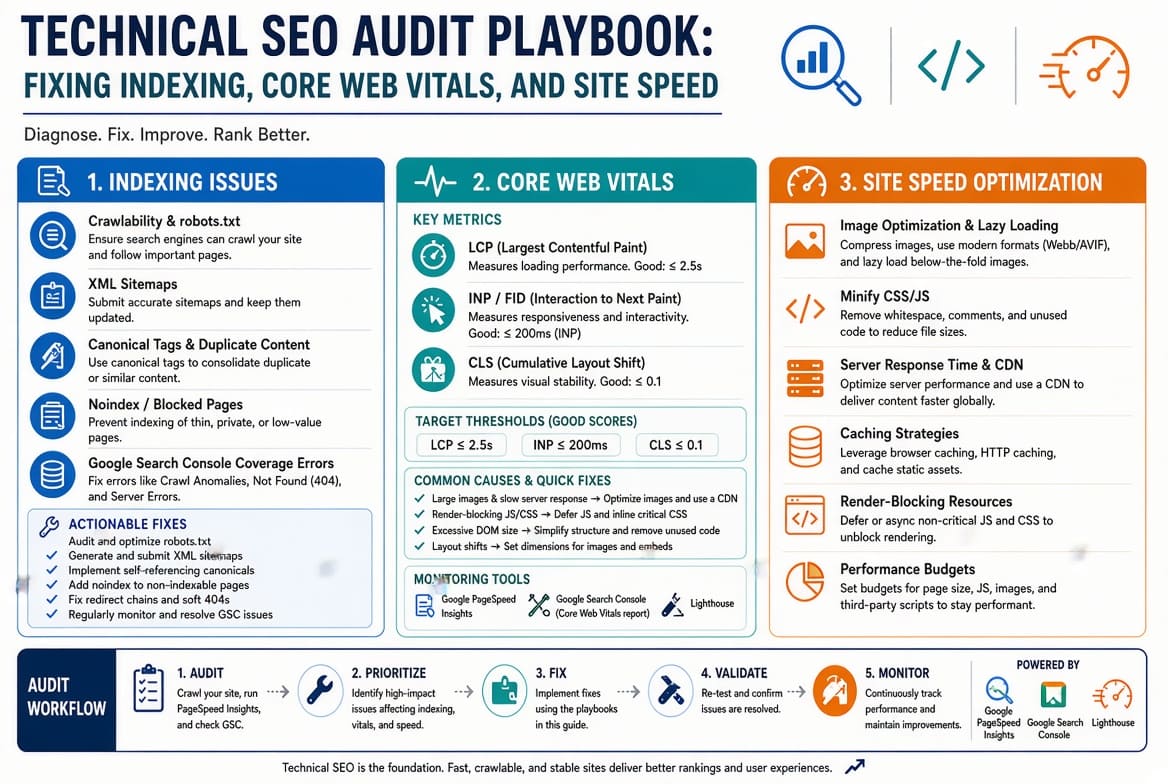
Google’s Core Web Vitals measure real-world user experience based on Chrome User Experience Report (CrUX) field data. Passing these metrics requires optimizing the critical rendering path.
┌─────────────────────────────────────────────────────────────────────────┐
│                    CORE WEB VITALS BENCHMARKS                           │
├──────────────────────────┬──────────────────────┬───────────────────────┤
│ Metric                   │ Target "Good"        │ Primary Cause of      │
│                          │ Threshold            │ Failure               │
├──────────────────────────┼──────────────────────┼───────────────────────┤
│ Largest Contentful Paint │ ≤ 2.5 Seconds        │ Unoptimized hero      │
│ (LCP)                    │                      │ images, slow TTFB     │
├──────────────────────────┼──────────────────────┼───────────────────────┤
│ Interaction to Next Paint│ ≤ 200 Milliseconds   │ Long JS main-thread   │
│ (INP)                    │                      │ tasks, execution lag  │
├──────────────────────────┼──────────────────────┼───────────────────────┤
│ Cumulative Layout Shift  │ ≤ 0.1 Score          │ Unsized images, dynamic│
│ (CLS)                    │                      │ content injections    │
└──────────────────────────┴──────────────────────┴───────────────────────┘
1. Optimizing Largest Contentful Paint (LCP)
LCP tracks the render time of the largest visible content block—typically a hero image or main heading.
- Eliminate LCP Image Lazy-Loading: Never apply
loading="lazy"to hero banner images located above the fold. Doing so forces the browser to wait until layout completion before fetching the primary image asset. - Preload Critical Assets: Inject explicit preloads into the document
<head>:
HTML
<link rel="preload" fetchpriority="high" as="image" href="/hero.webp" type="image/webp">
- Optimize Time to First Byte (TTFB): LCP fails if the server takes 1.5 seconds to return the initial document. Implement edge-caching via a Content Delivery Network (CDN) like Cloudflare or Fastly to keep global TTFB under 300 milliseconds.
2. Solving Interaction to Next Paint (INP)
INP evaluates page responsiveness across the user session. It measures the latency between an interaction (click, tap, keypress) and the visual feedback painted on screen.
- Break Up Long Tasks: Any JavaScript task occupying the main execution thread for over 50ms delays user input processing. Refactor long-running loops using
requestIdleCallback()orscheduler.postTask()to yield control back to the browser:
JavaScript
async function processDataInYields(array) {
  for (let item of array) {
    processChunk(item);
    // Yield main thread back to browser
    await new Promise(resolve => setTimeout(resolve, 0));
  }
}
- Audit Third-Party Tag Managers: Excessive tracking tags, heatmaps, and chat widgets are common causes of poor INP. Defer non-critical analytics or offboard tag execution using server-side Google Tag Manager (sGTM).
3. Eliminating Cumulative Layout Shift (CLS)
CLS measures unexpected visual movement during page load.
- Explicit Image Dimensions: Always specify explicit
widthandheightattributes on HTML<img>elements to reserve aspect ratio layout boxes prior to download:
HTML
<img src="/product.jpg" width="800" height="600" alt="Product View" style="aspect-ratio: 4/3; width: 100%; height: auto;">
- Preallocate Ad Slots and Dynamic Banners: Inject fixed CSS min-height properties on containers hosting dynamic ad units, cookie consent bars, or client-side widgets to prevent them from pushing content down upon rendering.
Part 3: Advanced Site Speed and Infrastructure Tweaks
- Modern Image Formatting: Convert image libraries from legacy JPEG/PNG formats to WebP or AVIF. AVIF provides up to 30% greater compression efficiency without visible quality loss.
- Font Display Strategies: Avoid Flash of Invisible Text (FOIT) by declaring
font-display: swap;inside your CSS@font-facedefinitions. - HTTP/3 and Compression: Ensure your web server supports HTTP/3 to reduce handshake overhead, and enable Brotli compression over Gzip for faster text asset delivery.
Technical SEO Execution Workflow
┌────────────────────────────────────────────────────────────────────────┐
│                        SEO AUDIT EXECUTION FLOW                        │
├────────────────────────────────────────────────────────────────────────┤
│ 1. Run Search Console Coverage Audit ──► Identify Indexing Errors      │
│ 2. Analyze CrUX Field Data          ──► Audit Real-User LCP / INP / CLS│
│ 3. Inspect Network Waterfall        ──► Identify TTFB & Asset Blockers │
│ 4. Refactor Server & Engine Stack   ──► Implement SSR / Edge Caching   │
│ 5. Validate Fixes via Lab Tools     ──► Re-submit Sitemaps to GSC      │
└────────────────────────────────────────────────────────────────────────┘
A well-executed technical SEO audit removes friction between search engine crawlers and your application code. Fixing core infrastructure issues ensures your content gets indexed correctly, ranks higher, and delivers a better experience to every visitor.
Related Articles