
Building Offline-First Web Applications for Low-Bandwidth Environments
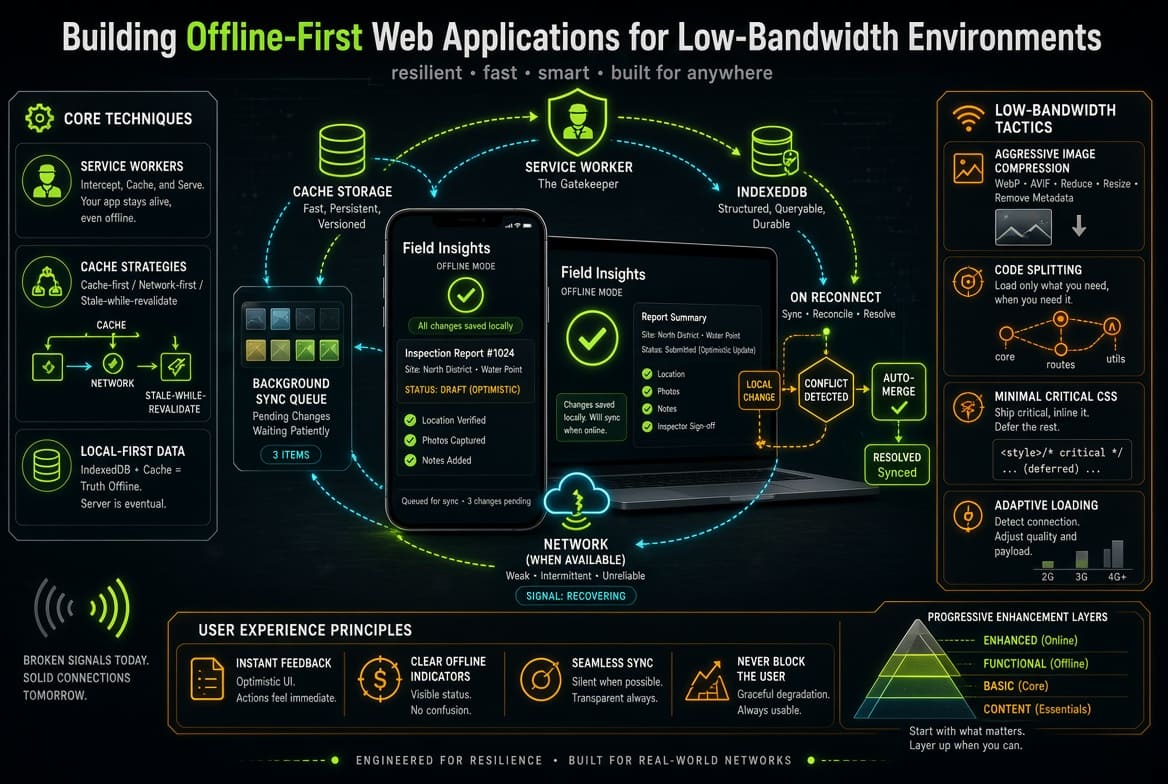
Web applications built exclusively for high-speed fiber internet often fail when deployed in areas with spotty mobile connections or high latency. When a network connection drops mid-session, traditional client-server apps can lock up, displaying blank screens, broken forms, or failed HTTP requests.
An offline-first application architecture flips this model. By treating the local device as the primary source of truth and the network connection as an asynchronous sync pipeline, platforms can deliver uninterrupted usability regardless of network reliability.
1. Architectural Foundation: Service Workers & Caching Strategies
At the heart of any offline-first Progressive Web Application (PWA) sits the Service Worker, a script running in a background thread independent of the main browser window.
┌─────────────────────────────────────────────────────────────────────────┐
│                 OFFLINE-FIRST NETWORK ARCHITECTURE                      │
├─────────────────────────────────────────────────────────────────────────┤
│                                                                         │
│  ┌──────────────┐      Request       ┌───────────────────────────────┐  │
│  │  App UI /    │ ─────────────────► │        Service Worker         │  │
│  │ Main Thread  │ ◄───────────────── │ (Interprets Network/Cache)    │  │
│  └──────────────┘      Response      └──────────────┬────────────────┘  │
│                                                     │                   │
│                                    ┌────────────────┴──────────────┐    │
│                                    │                               │    │
│                             Online │                        Offline│    │
│                                    ▼                               ▼    │
│                             ┌─────────────┐                 ┌─────────┐ │
│                             │ Remote API /│                 │ Indexed │ │
│                             │ Cloud Server│                 │ DB Cache│ │
│                             └─────────────┘                 └─────────┘ │
└─────────────────────────────────────────────────────────────────────────┘
Service Workers intercept outbound HTTP requests, deciding programmatically whether to fulfill data requests from the browser cache or fetch fresh responses from the live network.
Recommended Caching Strategies by Asset Type:
- Stale-While-Revalidate (Static App Shell & UI Layouts): Serves local cached files immediately for fast load times, while concurrently fetching updated versions in the background to update the cache for future sessions.
- Network First, Falling Back to Cache (Dynamic User Dashboards): Attempts to fetch live data from the network. If the connection times out or fails, it falls back to locally stored datasets, ensuring users can still access recent information.
- Cache First, Falling Back to Network (Static Media & Fonts): Reads directly from local cache storage to minimize bandwidth consumption, querying the network only when requested assets are missing from local storage.
2. Managing Local Client Storage using IndexedDB
Simple applications use localStorage for basic data persistence, but its synchronous design blocks the browser's main thread and offers strict storage limits (~5MB). Real-world offline applications require IndexedDB a low-level, asynchronous, transactional database embedded directly in the browser that comfortably stores hundreds of megabytes of structured data.
Implementing an IndexedDB Layer
Using lightweight wrapper libraries like Dexie.js simplifies working with raw IndexedDB transactions:
JavaScript
import Dexie from 'dexie';

// Initialize offline-first client database
const db = new Dexie('EnterpriseOfflineDB');
db.version(1).stores({
  pendingTransactions: '  id, payload, timestamp, syncStatus',
  cachedInventory: 'sku, name, price, stockCount'
});

// Save transaction locally when network drops
async function queueTransactionLocally(dataPayload) {
  await db.pendingTransactions.add({
    payload: dataPayload,
    timestamp: Date.now(),
    syncStatus: 'QUEUED'
  });
  console.log('Transaction safely stored locally in IndexedDB.');
}
3. Background Data Synchronization & Conflict Resolution
Capturing data offline is only half the battle; successfully re-synchronizing local writes back to central databases upon reconnecting requires deliberate conflict management.
1. Queue Management with Background Sync API
The BackgroundSync browser interface lets applications defer network requests until stable connectivity resumes, even if the user has closed the main browser tab.
JavaScript
// Register Background Sync inside Service Worker
navigator.serviceWorker.ready.then(swRegistration => {
  return swRegistration.sync.register('sync-pending-orders');
});
2. Conflict Resolution Strategies for Network Reconnects
When a device comes back online, locally queued edits may conflict with updates made to the central server during the offline period.
- Last-Write-Wins (LWW): Resolves conflicts by comparing timestamps and applying the most recent update. While straightforward, LWW risks overwriting server-side changes made by other users.
- Operational Transformation (OT) or CRDTs: Conflict-Free Replicated Data Types (CRDTs) allow distributed offline client nodes to merge mathematical mutations concurrently without locking databases, making them ideal for collaborative tools or complex inventories.
- Deterministic Server Reconciliation: The local client uploads queued payloads tagged with unique UUIDs and client-side timestamps. The server processes these actions sequentially within an isolated database transaction, flagging unresolvable logic collisions for manual user review.
4. UX Best Practices for Low-Bandwidth Applications
Offline functionality works best when users understand their current connectivity state and data sync status.
- Clear Connectivity Indicators: Display subtle visual indicators when the application shifts between online and offline modes (e.g., "Offline Mode — Changes will sync when reconnected").
- Optimistic UI Updates: Instantly render user actions on-screen before network requests complete. If a user creates a new record offline, add it to the visible interface immediately with a temporary "Sync Pending" badge rather than blocking the UI with a full-screen loading spinner.
- Bandwidth-Conscious Data Transfer: Minimize network usage on slow mobile networks by compressing JSON payloads, leveraging Delta updates (sending only changed data fields rather than full records), and serving responsive WebP images sized for mobile viewports.